How to clean the cargo cache and target folders
cargo clean deletes a project’s target folder, which Cargo rebuilds when needed. Downloaded crates live in the .cargo folder (registry and git), and are fetched again if deleted. Ruststudio’s Cargo Cleaner finds every target folder and cargo cache on your disk and deletes only what you select.
Updated · describes Ruststudio 0.1.5
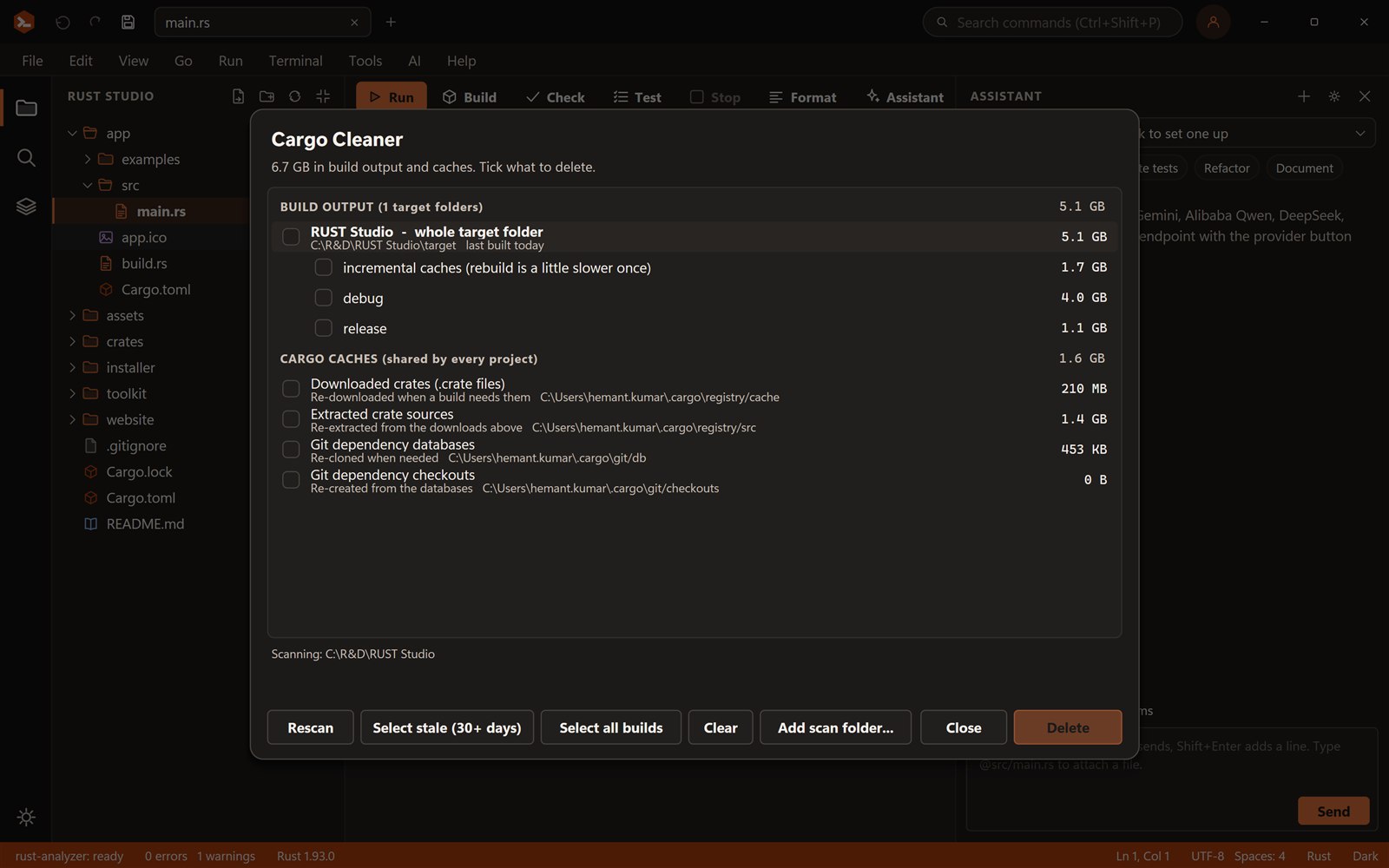
Rust builds can fill a disk. Here is what cargo clean removes, what lives in the .cargo folder, what is safe to delete, and how to clean all your projects in one go.
What takes space, and is it safe to delete?
| Location | What it holds | Safe to delete? | What happens next |
|---|---|---|---|
| <project>/target | Compiled code: debug, release and incremental caches | Yes | The next build is slow once, then normal |
| .cargo/registry/cache | Downloaded crate archives (.crate files) | Yes | Cargo downloads them again when a build needs them |
| .cargo/registry/src | Extracted crate sources | Yes | Cargo extracts them again from the cache |
| .cargo/git | Git dependencies and checkouts | Yes | Cargo fetches them again |
| .cargo/bin | Tools installed with cargo install, and rustup proxies | Not as a clean-up | Deleting it removes cargo, rustc and installed tools from your path |
What cargo clean does
cargo clean removes the target directory of the project you run it in, so the next build compiles everything again. It is the first thing to try when a build behaves strangely or a project has grown large. cargo clean --release removes only the release build, and cargo clean -p name removes one package’s artifacts.
It has one limit: it works on one project at a time. If you have a dozen projects, each with its own multi-gigabyte target folder, running it in every directory is tedious.
Where the .cargo folder is, and what to clear
Cargo keeps its home in .cargo inside your user folder (on Windows %USERPROFILE%\.cargo, on macOS and Linux ~/.cargo), unless the CARGO_HOME environment variable points elsewhere. The registry and git folders inside it hold every crate you have ever downloaded. They are caches: deleting them costs only a re-download. Do not delete .cargo/bin, which holds cargo itself and the tools you installed.
- Delete old target folders first: they are usually the biggest part
- Then clear registry/cache and registry/src if you need more room
- Keep .cargo/bin and .cargo/config.toml
Clean every project at once with Ruststudio
Ruststudio’s Cargo Cleaner (Ctrl+Shift+L) scans your projects and any folders you add, lists every target folder with its size, age and its debug, release and incremental parts, and lists the cargo caches. Select stale picks every target not built for 30 days. It refuses to delete anything that is not a cargo target or one of Cargo’s cache folders, and you confirm before anything is removed.
Frequently asked questions
Something else? Ask in the community forum or send feedback.
What does cargo clean do?
It deletes the target directory of the current project, so the next build compiles everything again. cargo clean --release removes only release builds.
Is it safe to delete the cargo registry?
Yes. The registry cache and sources are downloaded again when a build needs them. Keep .cargo/bin, which holds cargo and the tools you installed.
Where is the .cargo folder?
In your user folder: %USERPROFILE%\.cargo on Windows and ~/.cargo on macOS and Linux, unless CARGO_HOME is set to another place.
How do I clean the cargo cache for all projects?
cargo clean works on one project at a time. Ruststudio’s Cargo Cleaner lists every target folder and cargo cache on your disk with size and age, and deletes the ones you select.
Why is my Rust target folder so big?
Cargo keeps a separate build for each profile and dependency version, plus incremental caches, and does not remove them on its own. A busy machine can reach tens of gigabytes.