Ruststudio 0.1.6: Git, a test explorer, inlay hints and package sources, built into the IDE
The 0.1.6 release: a Source Control view that runs your own git, a test explorer with Run and Debug icons beside every test, inlay hints, variable values while debugging, and package sources you can add.
Updated · describes Ruststudio 0.1.6
Ruststudio is a free IDE for Rust that is itself written in Rust. Version 0.1.6 is about the things you do between writing code and shipping it: looking at what you changed, committing it, running one test, and adding a package. Until now each of those meant opening a terminal. This release moves them into the editor, and tries to do it without hiding what the tools are doing.
(Version 0.1.4 was built but never released, and 0.1.5 added the JavaScript and TypeScript debugger. This post covers 0.1.6.)
Seeing what you changed: the Source Control view
Press Ctrl+Shift+G. The Source Control view lists your changes in four groups (merge conflicts, staged, not staged, untracked), and a file or a whole group can be staged, unstaged or discarded with one click.
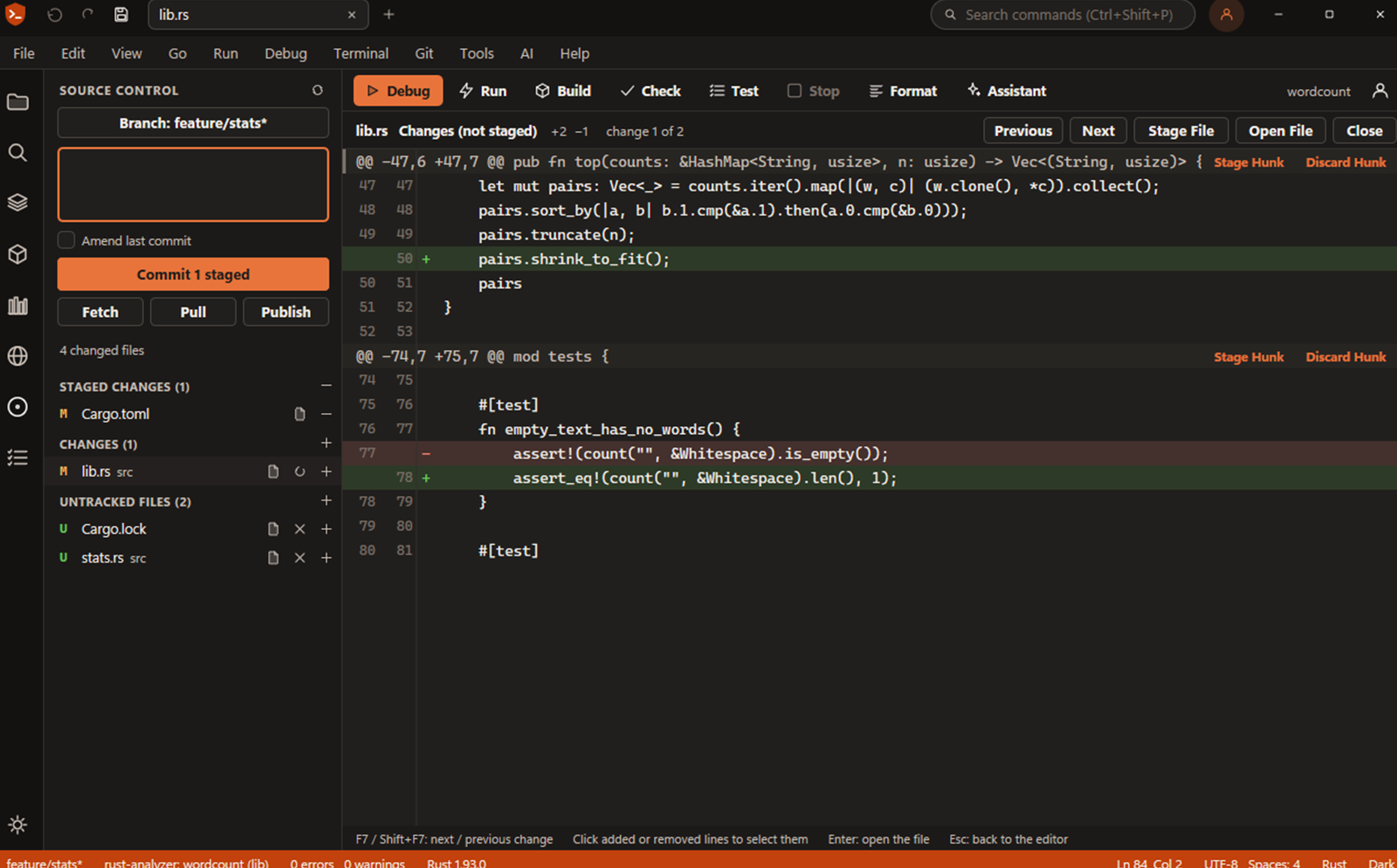
The decision I want to explain is that Ruststudio runs your own `git`. It does not carry a Git implementation of its own. That means your hooks run, your .gitconfig applies, and your credential helper signs you in. Ruststudio never asks for a password and never stores one. When Git refuses something, you see Git's own message in the Output panel, and nothing is forced: there is no hidden --force.
What the view does:
- A diff you can act on. Open a changed file and the diff shows the line numbers of both sides. You can stage, unstage or discard one change (a hunk), or only the lines you click. F7 and Shift+F7 move between changes.
- Bars in the margin. Lines that were added, changed or removed since the last commit get a bar beside the line number, updated as you type. Click one to see what was there before, revert it, or stage it. Alt+F3 and Shift+Alt+F3 jump between them.
- Commit. A multi-line message box (Ctrl+Enter commits), amend, commit all, and a hint when the first line gets long. Hook output appears in the Output panel. If Git does not know your name and e-mail, one click sets them.
- Branches. The status bar shows the branch and what is to push and pull. The branch list switches, creates, and deletes branches that are already merged.
- Fetch, Pull and Push show progress and can be cancelled. Pull is fast-forward only and asks before it merges or rebases. The first push of a branch asks before publishing it.
- Merge conflicts are listed first. In the editor the two sides are tinted, and Accept Current, Incoming or Both settles one.
- Blame and history. Git > Toggle Blame shows who last changed the current line, and File History lists the commits of the open file, following renames.
The view refreshes when something happens (a command, a save, a build, coming back to the window), not on a timer, so it does not poll your repository in the background.
What it does not do yet: the diff is unified, not side by side; there is no stash, tag or cherry-pick, no interactive rebase and no commit graph. The Terminal does those, and the Git you use there is the same one.
Running one test
Rust tests are cheap to run and awkward to find. In 0.1.6 every test function gets a Run and a Debug icon in the margin, and so does fn main. The icons are there as soon as a file is open, with no build needed. After a run, the icon turns into a green tick or a red cross.
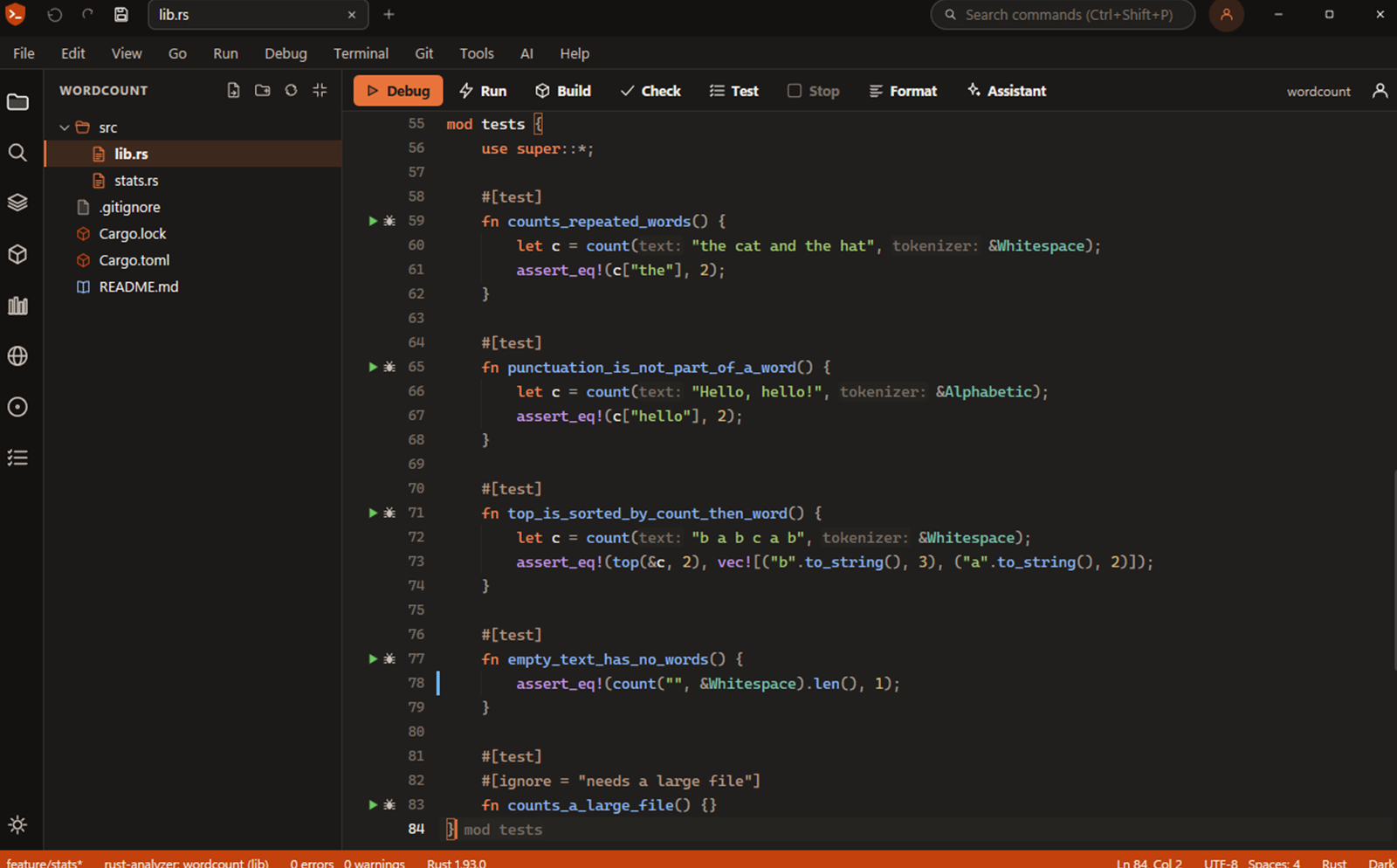
Click Run and only that test runs. Click Debug and the test program is built and started under the debugger with that one test, so a breakpoint in the test, or in the code it calls, is hit, and the variable values appear at the end of the lines as they do for any debug session. The same is available from the keyboard: F6 runs the test at the cursor, Shift+F6 debugs it, Ctrl+F6 runs the tests of the file, and Ctrl+Shift+F6 repeats the last run.
The Test Explorer (Alt+F6) is the whole list. It shows the tests the way Cargo reports them: package, test binary, module, test, with doc tests and ignored tests included. It has a filter, Run All, Run Failed, and Run or Debug for the selected row.
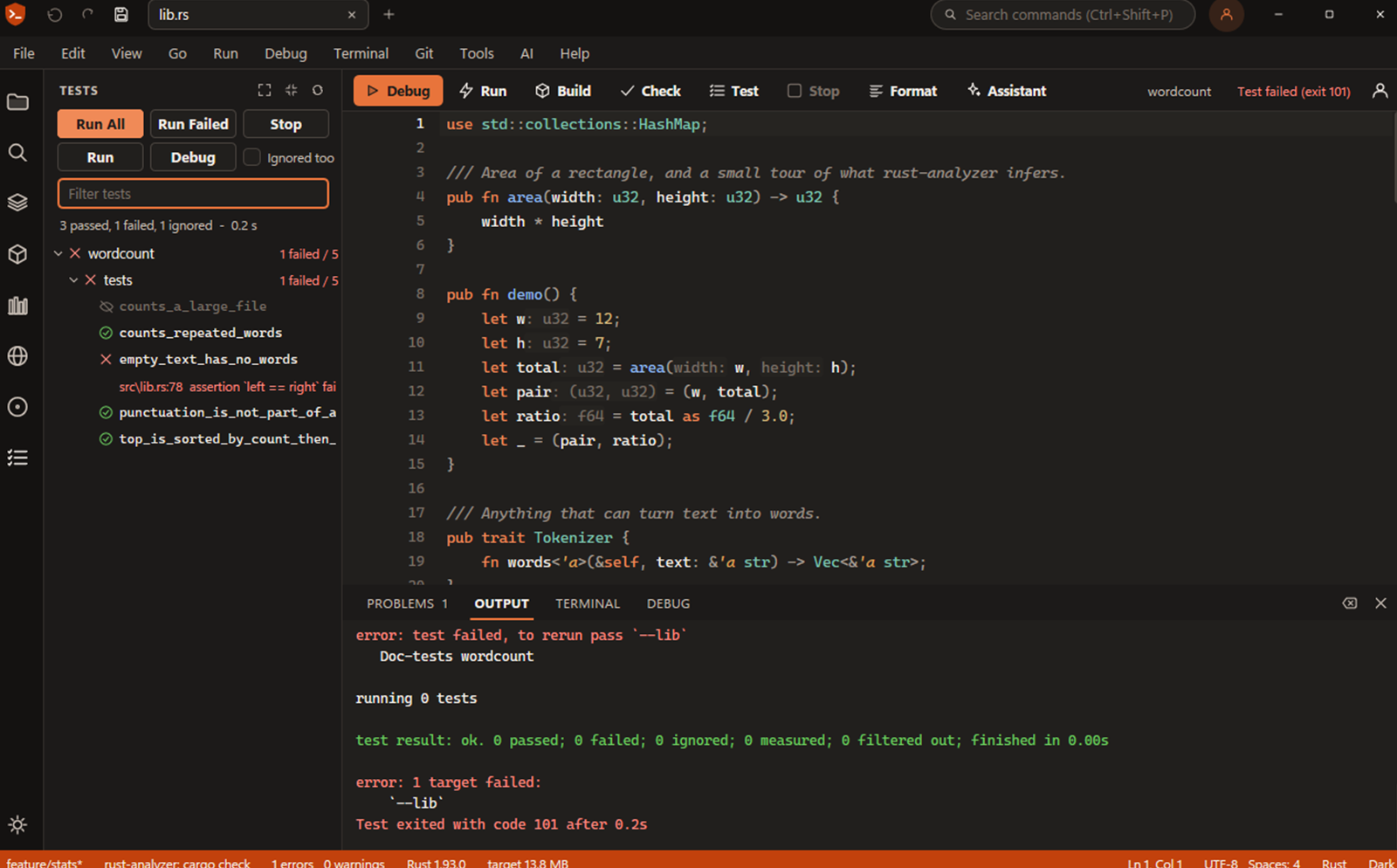
Results arrive per test while the run is still going. A failed test shows its panic message and the file and line under it; click to go there. It is also listed in the Problems panel, so a failing test reads like a compile error. Stop ends the run, and the full output is in the Output panel.
Under the hood it is your own cargo test, with the toolchain and the Debug or Release configuration you chose. The list is refreshed after a save, not on a timer. Two things change for existing habits: Ctrl+Shift+T (Run All Tests) now shows each result in the Test Explorer and lets every test binary finish, and Ctrl+Shift+G now opens Source Control (it used to be a second key for Go to Line; Ctrl+G is unchanged).
What it does not do yet: no code coverage and no time per test. Doc tests can be run but not debugged, and tests generated by macros have no icon in the margin.
Inlay hints and values while you debug
rust-analyzer already knows the types, and now you can see them. Inlay hints show the type of a variable after its let, the parameter name at a call, and the types along a method chain, drawn dim inside the code.
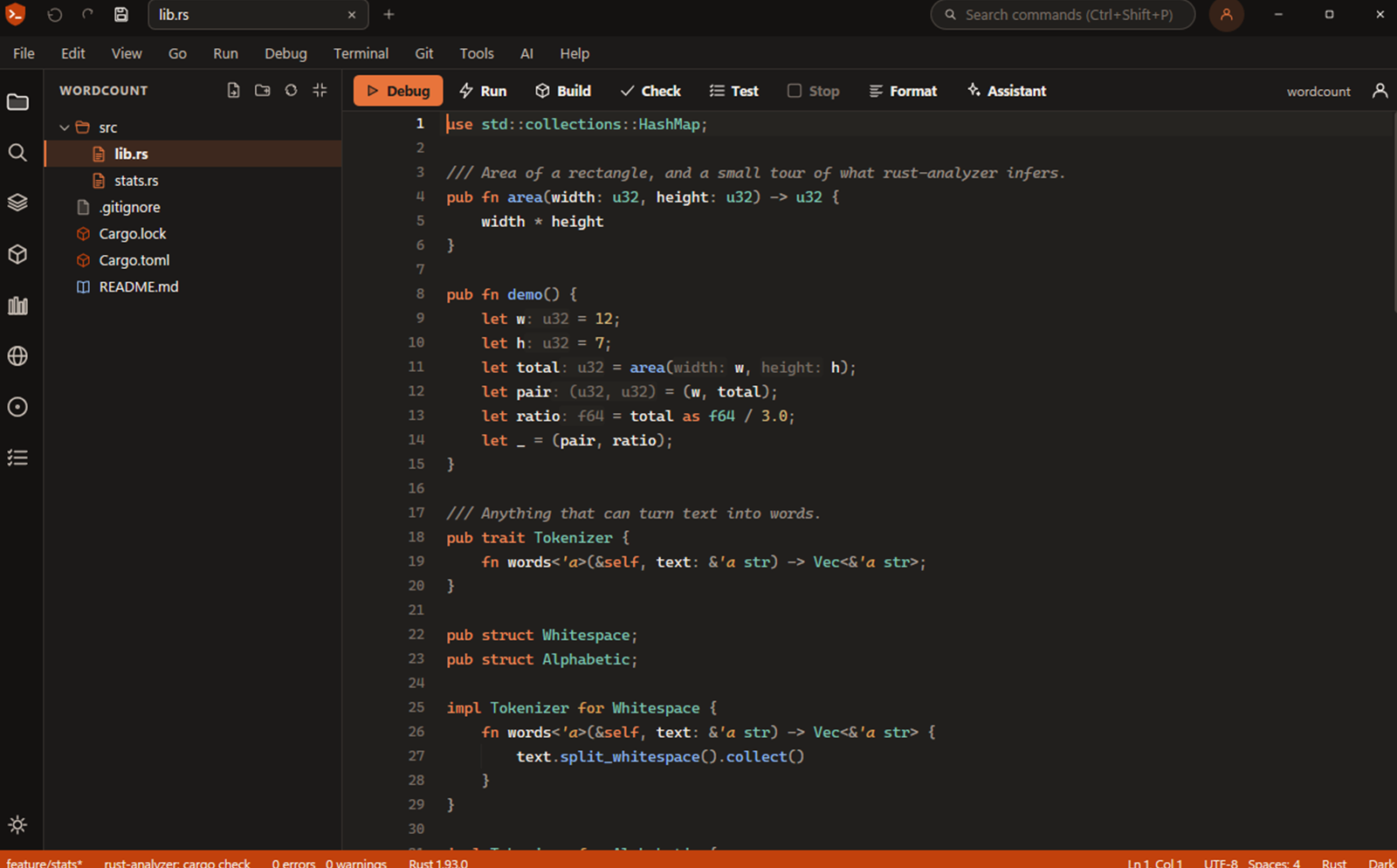
They are not part of the file, and the caret steps over them, so they never end up in your code or your diff. View > Toggle Inlay Hints turns them off. A note from my own testing: the hints come from rust-analyzer, so they are only as good as what it can resolve. On a machine where it could not resolve the standard library, I saw {unknown} for some types; installing the rust-src component (rustup component add rust-src) is the first thing I would try.
The same idea works for the debugger. When the program is paused, the values of the function's variables appear at the end of the lines that use them, and refresh at every step. Debug > Toggle Inline Values While Debugging turns them off.
One small navigation addition: Go to Implementation (Shift+Alt+F12, and in the right-click menu). One implementation opens directly; several are listed the way Find All References lists them. Ctrl+F12 still works.
Package sources, and publishing from the IDE
The Rupm and NuGet views now take a list of sources. nuget.org, the Ruststudio NuGet feed, crates.io and rupm are built in, and you can add any NuGet V3 feed or Cargo sparse registry under Tools > Packages: Manage Sources. Each source can be switched on or off and tested, and the view lets you search all of them or one. Every result names where it came from. If one source cannot be reached, it is named with the reason and the others still answer.
Publishing is in the same place. Packages: Publish to rupm runs cargo publish, and Packages: Publish to NuGet pushes the package that Pack made. Before anything is sent, a dialog shows the package, the version and the registry, and says that publishing is public; a dry run uploads nothing. Your API key comes from the website's Packages page, and it is never shown, logged or written into a project.
On the website side, rupm and NuGet now have public package pages, and you can register an account, upload a package and manage your keys in the browser. Each package page has an Install in Ruststudio link. It is checked strictly, the package is looked up on your own source, and nothing is installed until you say yes.
What is not there yet: the key is pasted once from the website (the IDE does not create keys by itself), there is no list of your published packages inside the IDE, and the solution does not record which source a NuGet package came from.
What is not in 0.1.6
Native iOS apps are still in development and are not part of this release. The macOS and Linux builds are newer than the Windows one and have had less testing; if you meet a problem, the feedback page is the quickest way to tell me.
Try it
Download Ruststudio 0.1.6 for Windows, macOS or Linux. It installs per user, needs no administrator rights, and uses the rust-analyzer and Cargo you already have. The short list of changes is in the release notes.